PDF Merger
Drop and Merge - Combine multiple PDF files into a single document in seconds. Upload your files, drag to reorder them, then merge and download the result. Learn how to merge PDF →
How PDF merge works
A PDF merge operation parses the root object catalog and page trees of each source document, re-indexes indirect object references, and constructs a unified page tree in memory. The resulting output file resolves all internal pointers through a newly generated cross-reference table without corrupting original text, vector paths, or embedded resources.
How merged size is determined
The merged PDF file size equals the cumulative byte size of all preserved page streams, embedded fonts, and raster images, plus structural overhead for the reconstructed XRef table, /Catalog dictionary, and trailer. Uncompressed duplicate fonts across separate files may slightly increase the aggregate byte count unless stream compression is applied.
Why use an online merger
Browser-based merging executes entirely client-side using JavaScript/WebAssembly memory allocation, eliminating software installations while ensuring zero server retention for uncompressed operations. Optional cloud compression utilizes ephemeral, encrypted storage with automated 30-minute lifecycle deletion.
Best practices
- Merge in logical sequence — arrange input files beforehand to preserve correct chapter pagination.
- Compress post-merge — enable the compression option to downsample redundant image streams and prune unused font glyphs.
- Unlock encrypted files — remove open/read passwords prior to merging so the parser can traverse object dictionaries.
What it does
- Combines multiple independent PDF documents into a single, standardized, multi-page PDF container.
Useful when
- Consolidating monthly invoices, financial statements, and receipts into a unified audit packet.
- Assembling academic research papers, cover letters, and supporting portfolio appendices.
- Combining separately scanned multi-page legal contracts and notarized signature folios.
Comparison
- Executes high-performance in-memory PDF assembly directly in your browser without desktop licensing fees.
Privacy & retention
Standard merging is executed 100% locally within your client browser memory. When the optional compression pipeline is engaged, files are encrypted in transit via TLS 1.3, stored in temporary Cloudflare R2 storage buckets, and purged automatically within 30 minutes. Files are never permanently stored, indexed, or shared.
FAQs
- Q: Is my document data private and secure? A: Yes. Merging operates client-side in browser RAM, and compressed files are auto-purged from secure R2 storage after 30 minutes.
- Q: Will merging alter visual formatting or page layout? A: No. Page dimensions, MediaBox boundaries, vector graphics, and embedded font glyphs are preserved exactly.
- Q: Can I reorder pages and files before merging? A: Yes. Drag and drop file items in the queue to define the exact page sequence.
- Q: Is there a restriction on the number of merged PDFs? A: No hard limit is imposed; browser RAM capacity is the only constraint for large batches.
- Q: How do I reduce the merged file size if it is too large? A: Check the 'Compress merged PDF' option to run FlateDecode stream optimization and image downsampling.
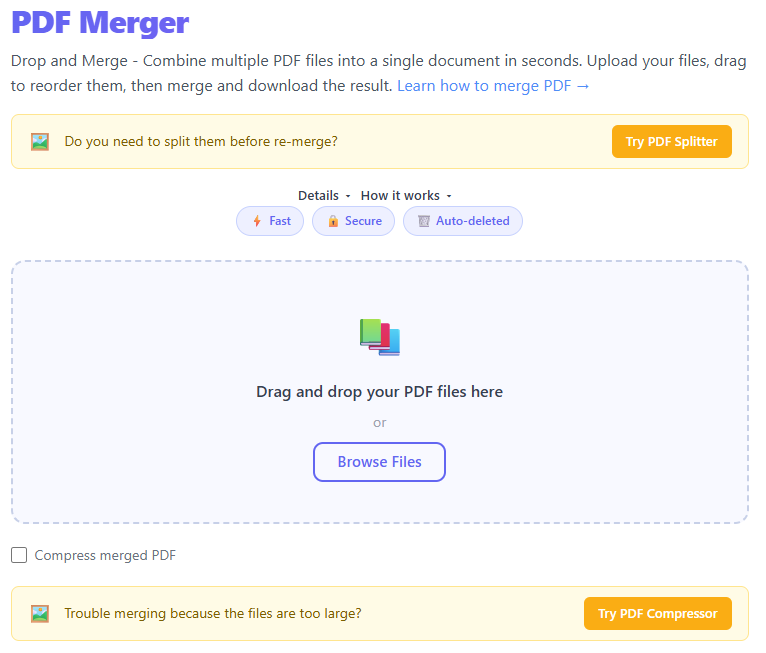
Upload the PDF files you want to merge.
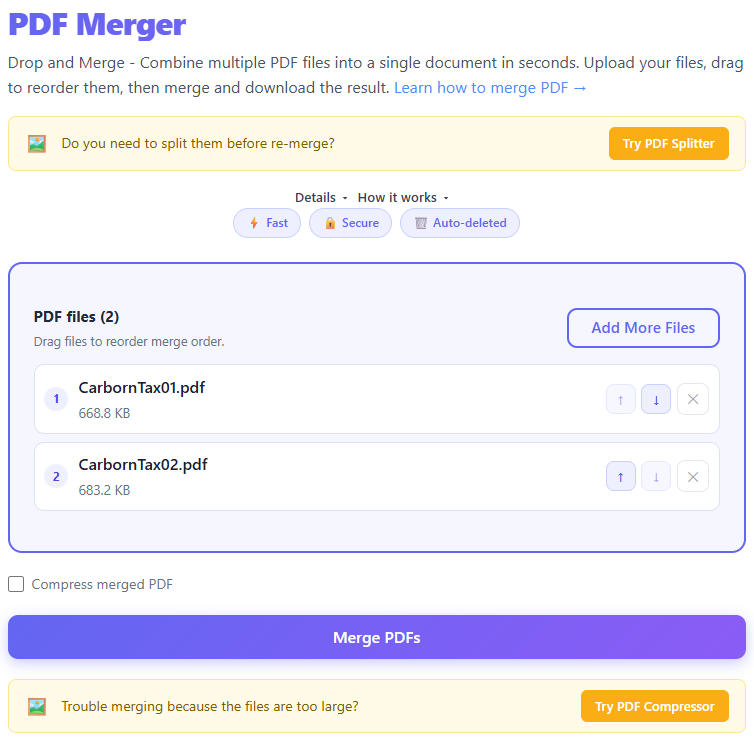
Drag to reorder files to set the merge order.
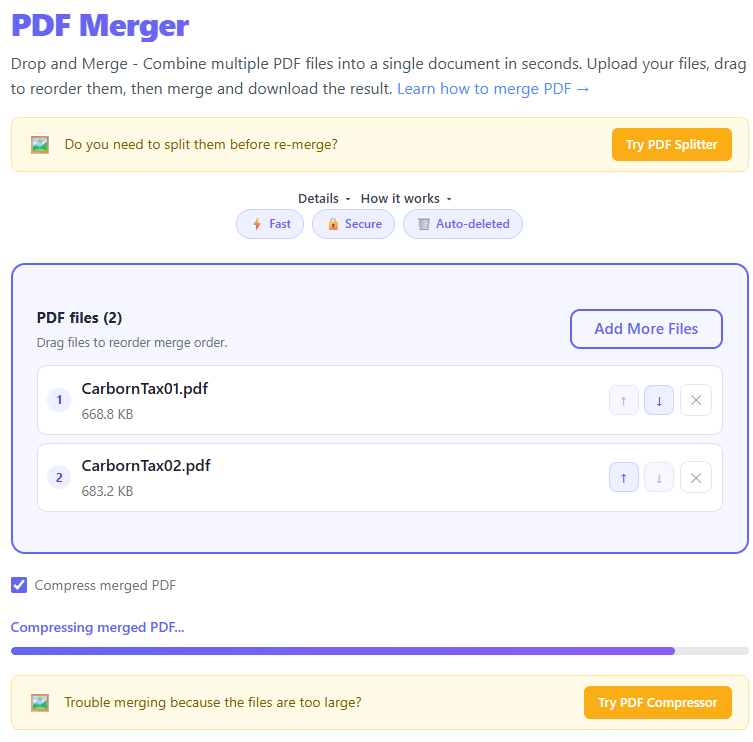
Click Merge to send files to the backend merging process.
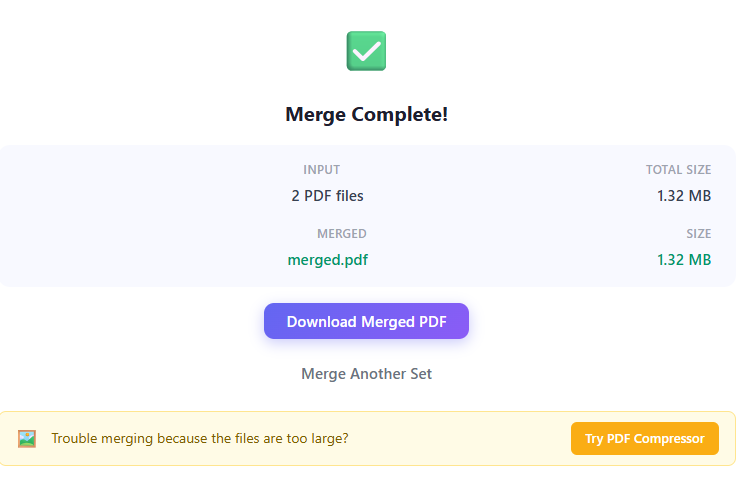
Download the merged PDF when processing completes.
Comprehensive Guide to PDF Merging: Architecture, Mechanics & Best Practices
Consolidating multiple PDF files into a single, cohesive document is essential for enterprise reporting, legal bundling, academic submissions, and digital archiving. Rather than emailing fragmented attachments, a merged PDF establishes a structured reading flow with unified bookmarks and consistent pagination.
👉 Learn how PDF object trees, XRef tables, and resource dictionaries are unified during the merge process.
📌 What Is a PDF Merger?
A PDF merger is an engine designed to assemble multiple binary PDF containers into a single document structure by:
- 📄 Parsing and unifying independent /Pages hierarchy trees
- 🔀 Re-indexing indirect object numbers and cross-document references
- ➕ Preserving embedded font programs, color spaces, and vector assets
- 📥 Compiling a standardized cross-reference table and root trailer
🎯 Why Merging PDFs Matters
- Structural Organization — transforms disconnected individual pages into a unified, sequential reading hierarchy.
- Seamless Distribution — eliminates attachment sprawl by delivering a single, polished file.
- Integrity & Compliance — maintains exact vector fidelity, form fields, and cryptographic hashes.
- Optimized Workflows — accelerates batch printing, legal discovery e-filing, and document indexing.
🛠 Common Enterprise & Personal Use Cases
- 💼 Corporate Dossiers — combine executive summaries, financial tables, and audit balance sheets.
- 🎓 Academic Submissions — merge research manuscripts, charts, references, and advisor approvals.
- 🧾 Scanned Document Folios — assemble individual flatbed scanner outputs into continuous contracts.
- 📑 Application Packets — unite resumes, cover letters, letters of recommendation, and transcripts.
🧠 How PDF Merging Works (Overview)
The merge engine loads source PDF binaries into memory, parses the root catalog dictionary, extracts page objects, updates indirect reference pointers, and serializes a newly calculated cross-reference stream to produce the output document without visual degradation.
⚙️ Technical Architecture & Document Merging Mechanics
Here is how the PDF document object model (DOM) is processed in memory:
Object Catalog & Page Tree Merging (/Catalog & /Pages)
Every valid PDF file contains a root /Catalog dictionary that references the root of the /Pages object hierarchy. When combining multiple documents, the merger traverses the balanced B-tree of /Pages nodes in each source PDF, extracts all individual /Page dictionaries (including /MediaBox, /CropBox, /Rotate, and /Contents streams), and synthesizes a unified /Pages tree in memory. Parent-child pointers (/Parent and /Kids arrays) and total page count (/Count integers) are recalculated dynamically to ensure structural integrity across standard PDF readers.
Cross-Reference Table (XRef) & Pointer Rebuilding
PDFs rely on a Cross-Reference Table (or compressed /XRef stream) containing exact byte offsets for every indirect object (e.g., '12 0 obj'). Merging multiple files invalidates all original byte offsets. The merge processor re-indexes all indirect object identifiers into a contiguous numerical range (1 to N), rewrites every reference pointer ('12 0 R') throughout content streams and resource dictionaries, and builds a brand-new XRef table and /Trailer dictionary from scratch. This prevents broken object pointers and file corruption.
Font Subsetting & Duplicate Resource Deduplication
Source PDFs often embed partial subsets of standard typography (such as Helvetica, Times-Roman, or custom OpenType fonts with randomized 6-letter tag prefixes like ABCDEF+Arial). During merging, the engine inspects the /Resources /Font dictionaries across all incoming pages. Identical font subsets and common font descriptor programs are deduplicated where possible to prevent bloated file sizes, while unique subset dictionaries are isolated to eliminate glyph ID mapping collisions in the /ToUnicode CMap.
Client-Side Memory Allocation & Cryptographic Privacy
Standard merging operations execute 100% locally within client browser memory utilizing JavaScript typed arrays (Uint8Array, ArrayBuffer) and WebAssembly execution pipelines. Document bytes are never transmitted to an external server unless the user explicitly checks the compression option. In the compression pipeline, files are transferred over TLS 1.3 encrypted sockets to isolated Cloudflare R2 storage containers configured with an automated 30-minute lifecycle purging rule, ensuring strict document confidentiality.
🧭 Step-by-Step: Merge PDFs with Precision
- 📤 Upload source PDF files into the drop zone
- 👀 Review queue order and reorder files using drag-and-drop or directional controls
- ⚙️ Toggle optional post-merge compression if smaller file size is desired
- 🚀 Click 'Merge PDFs' to trigger in-memory catalog assembly
- 📥 Download your unified PDF document immediately
🎨 Professional Tips for Flawless PDF Merging
- ✅ Establish Logical Hierarchy — order pages sequentially (Title Sheet → Table of Contents → Body Sections → Appendices).
- ✅ Standardize Page Dimensions — review mixed letter and A4 documents to verify print alignment.
- ✅ Remove Redundant Pages — purge blank trailing pages or superseded draft revisions prior to merging.
- ✅ Verify Interactive Elements — test embedded hyperlinks, digital signatures, and outline bookmarks in the final PDF.
⚠️ Common Merging Pitfalls & How to Avoid Them
- ❌ Inadvertent Page Inversion — failing to verify file queue order prior to serialization.
- ❌ Unresolved Form Name Collisions — combining interactive forms with duplicate field names without namespace prefixing.
- ❌ Merging Password-Locked PDFs — neglecting to remove security restrictions before initiating merge.
- ❌ Overlooking Large File Inflation — neglecting font subsetting and image stream compression across large batches.
- ❌ Disregarding Text Layers — rasterizing pages into images instead of performing true vector DOM merging.
🔍 PDF Merger vs PDF Splitter
| Feature | PDF Merger | PDF Splitter |
|---|---|---|
| Core Purpose | Unify multiple PDF containers into one file | Extract or partition pages into separate files |
| Output Structure | Single consolidated PDF with unified /Catalog | Multiple standalone PDFs or discrete segments |
| Primary Use Case | Dossier creation, report bundling, archiving | Extracting chapters, isolating invoices, forms |
📊 PDF Internal Element Handling Specification
The following reference specification details how low-level internal PDF structures are handled during concatenation and how structural conflicts are resolved:
| PDF Internal Element | Technical Handling During Merge | Potential Conflict & Resolution |
|---|---|---|
| AcroForms / Interactive Fields | Form dictionaries are unified under the root /AcroForm entry. | Field name collisions (e.g., two fields named Signature1) require automatic namespace prefixing or field renaming to prevent form field value collisions. |
| Outlines / Bookmarks | Bookmarks are merged into a nested, multi-level hierarchical tree. | Destination targets (/Dest) are updated to reflect new page index offsets in the merged document. |
| Embedded Fonts | Identical font subsets are deduplicated when possible. | Differing custom subsets with matching names are retained separately to prevent glyph rendering corruption. |
| XMP Metadata & Annotations | Metadata is unified or overridden; annotations (/Annots) are preserved per page. | Document-level author/title metadata defaults to the primary file or custom output parameters. |
❓ Frequently Asked Technical Questions (FAQ)
How does the merger handle password-protected or encrypted PDFs?
Encrypted PDFs protected with standard 40-bit, 128-bit, or 256-bit AES/RC4 encryption contain an /Encrypt dictionary that restricts access to the object stream. If a file requires a User/Open password, it must be decrypted before merging because the parser cannot access the /Pages tree without the cryptographic key. Permission-locked PDFs (Owner password) can be processed if content extraction permissions allow reading.
What happens when combining documents with mixed page orientations (Portrait vs. Landscape)?
Each page object in a PDF dictionary contains independent /MediaBox and /Rotate attributes (0°, 90°, 180°, or 270°). The merge engine preserves each page's specific bounding box and coordinate transformation matrix individually within the unified page tree, ensuring portrait and landscape pages coexist seamlessly without distortion or clipping.
How are interactive form field name collisions resolved when merging two fillable forms?
When merging multiple PDFs with /AcroForm dictionaries, identical field names (such as 'Signature1' or 'Date') conflict if merged into a flat array. The merge processor unifies form fields under the root /AcroForm entry while qualifying conflicting field names with unique hierarchical namespace prefixes to prevent accidental data overwriting.
Why does merging multiple small PDFs sometimes result in a file size larger than the sum of the individual files?
A merged PDF requires a consolidated Cross-Reference Table (XRef), unified /Catalog metadata, and updated trailer dictionaries. Furthermore, if source files contain distinct embedded font subsets for the same font family, each unique subset must be retained to preserve character glyphs, resulting in slight cumulative structural overhead.
How are internal hyperlinks and destination anchors preserved across merged documents?
Internal link annotations (/Type /Annot /Subtype /Link) reference target destinations (/Dest) via explicit page pointers or named destination trees (/Names /Dests). During merging, the engine shifts destination page index offsets by the cumulative page count of preceding files, ensuring that all internal navigation links point to the correct relocated pages.
What is the maximum browser RAM threshold when merging dozens of high-resolution PDF files simultaneously?
In-browser client-side merging relies on JavaScript ArrayBuffer allocations within the browser tab. In modern 64-bit browsers (Chrome, Firefox, Edge, Safari), heap memory limits typically range from 1.5 GB to 4 GB per tab. Merging dozens of ultra-high-resolution scans may approach memory thresholds; enabling compression offloads memory load to keep processing swift.
How does color profile management (CMYK vs. sRGB) work when merging press-ready PDFs with web-rendered PDFs?
PDF pages declare their color space in local /Resources /ColorSpace dictionaries (e.g., /DeviceCMYK, /DeviceRGB, or /ICCBased). The merge engine maintains localized resource dictionaries for each page stream, preventing global color corruption when mixing commercial print CMYK pages with sRGB web graphics.
Does merging flattened PDFs affect text layer extraction for OCR engines?
No. True PDF merging concatenates the underlying vector page content streams (BT ... ET text blocks) and Character-to-Unicode mapping tables (/ToUnicode CMap). OCR engines and text extractors can search, highlight, and copy text from merged documents without any loss of optical fidelity.
Can PDF/A compliance (ISO 19005) be maintained when merging standard PDFs?
PDF/A compliance requires all fonts to be 100% embedded, device-independent color profiles (/OutputIntents), and the absence of audio/video or JavaScript streams. If all source documents comply with PDF/A and the merged metadata includes the requisite XMP schema, PDF/A validity is preserved.
What is the difference between merging page trees versus rasterizing pages into images?
Structural page tree merging copies native vector paths, fonts, and text objects directly, resulting in sharp rendering at any zoom level and small file sizes. In contrast, rasterizing converts pages into flat bitmap images, which causes blurry text, destroys text searchability, and dramatically bloats file sizes.